
Game Card Deck Design Guide
This guide is for creators designing custom game cards with fully bespoke sizes and formats. Game cards are mechanics-driven components of tabletop, card, and hybrid games, where rules, interactions, and player experience define the design—not tradition or standard sizing.
Because game cards are purpose-built, every design decision should support gameplay clarity, balance, and usability.
1. What are Game Cards?
4. Iconography & Symbols
7. Colour Considerations
10. Game Card Design Mistakes
2. Game Card Specifications
5. Layout Consistency
8. File Setup & Print Req.
11. Ready to Print?
3. Card Face Design
6. Card Back Design
9. Paper Stock & Finish

1. What are Game Cards?
Game cards are functional components used to:
-
Drive gameplay mechanics
-
Convey rules, actions or states
-
Introduce randomness, strategy or progression
-
Support interaction between players and systems
They are commonly used in:
-
Tabletop and card games
-
Educational or serious games
-
Role-playing or narrative systems
-
Hybrid board–card games
Unlike playing cards, game cards are defined by what they do, not how they look.
2. Game Card Specifications
Custom Card Size
There is no standard size for game cards.
Size should be determined by:
-
Amount of information per card
-
Table space requirements
-
Hand management and shuffling needs
-
Target audience (children, adults, accessibility)
Smaller cards favour speed and hand management; larger cards support text, icons and diagrams.
Card Count
Game card decks vary widely:
-
20–50 cards for simple mechanics
-
50–150+ cards for complex systems
Consider whether cards are:
-
Drawn frequently
-
Held in hand
-
Laid out on the table
These factors affect durability and layout decisions.
Game Card Deck
Design Guide
This guide is for creators designing custom game cards with fully bespoke sizes and formats. Game cards are mechanics-driven components of tabletop, card, and hybrid games, where rules, interactions, and player experience define the design, not tradition or standard sizing.
Because game cards are purpose-built, every design decision should support gameplay clarity, balance, and usability.
1. What are Game Cards?
2. Game Card Specifications
3. Card Face Design
4. Iconography & Symbols
5. Layout Consistency
6. Card Back Design
7. Colour Considerations
8. File Setup & Print Req.
9. Paper Stock & Finish
10. Game Card Design Mistakes
11. Ready to Print?
1. What are Game Cards?
Game cards are functional components used to:
-
Drive gameplay mechanics
-
Convey rules, actions or states
-
Introduce randomness, strategy or progression
-
Support interaction between players and systems
They are commonly used in:
-
Tabletop and card games
-
Educational or serious games
-
Role-playing or narrative systems
-
Hybrid board–card games
Unlike playing cards, game cards are defined by what they do, not how they look.
2. Game Card Specifications
Custom Card Size
There is no standard size for game cards.
Size should be determined by:
-
Amount of information per card
-
Table space requirements
-
Hand management and shuffling needs
-
Target audience (children, adults, accessibility)
Smaller cards favour speed and hand management; larger cards support text, icons and diagrams.
Card Count
Game card decks vary widely:
-
20–50 cards for simple mechanics
-
50–150+ cards for complex systems
Consider whether cards are:
-
Drawn frequently
-
Held in hand
-
Laid out on the table
These factors affect durability and layout decisions.
Game Card Deck Design Guide
This guide is for creators designing custom game cards with fully bespoke sizes and formats. Game cards are mechanics-driven components of tabletop, card, and hybrid games, where rules, interactions, and player experience define the design, not tradition or standard sizing.
Because game cards are purpose-built, every design decision should support gameplay clarity, balance, and usability.
1. What are Game Cards?
2. Game Card Specifications
3. Card Face Design
4. Iconography & Symbols
5. Layout Consistency
6. Card Back Design
7. Colour Considerations
8. File Setup & Print Req.
9. Paper Stock & Finish
10. Game Card Design Mistakes
11. Ready to Print?
1. What are Game Cards?
Game cards are functional components used to:
-
Drive gameplay mechanics
-
Convey rules, actions or states
-
Introduce randomness, strategy or progression
-
Support interaction between players and systems
They are commonly used in:
-
Tabletop and card games
-
Educational or serious games
-
Role-playing or narrative systems
-
Hybrid board–card games
Unlike playing cards, game cards are defined by what they do, not how they look.
2. Game Card Specifications
Custom Card Size
There is no standard size for game cards.
Size should be determined by:
-
Amount of information per card
-
Table space requirements
-
Hand management and shuffling needs
-
Target audience (children, adults, accessibility)
Smaller cards favour speed and hand management; larger cards support text, icons and diagrams.
Card Count
Game card decks vary widely:
-
20–50 cards for simple mechanics
-
50–150+ cards for complex systems
Consider whether cards are:
-
Drawn frequently
-
Held in hand
-
Laid out on the table
These factors affect durability and layout decisions.
3. Card Face Design
Functional Priority
Every element on a game card should serve gameplay.
Common content includes:
-
Actions or abilities
-
Costs, values or modifiers
-
Conditions or triggers
-
Flavour text or narrative elements
Avoid decorative elements that interfere with clarity.
Typography
Text must be readable at a glance.
Best practices:
-
Clear, game-appropriate fonts
-
Strong hierarchy (title, effect, rules)
-
Consistent placement across the deck
Rules text should be unambiguous and concise.
3. Card Face Design
Functional Priority
Every element on a game card should serve gameplay.
Common content includes:
-
Actions or abilities
-
Costs, values or modifiers
-
Conditions or triggers
-
Flavour text or narrative elements
Avoid decorative elements that interfere with clarity.
Typography
Text must be readable at a glance.
Best practices:
-
Clear, game-appropriate fonts
-
Strong hierarchy (title, effect, rules)
-
Consistent placement across the deck
Rules text should be unambiguous and concise.
3. Card Face Design
Functional Priority
Every element on a game card should serve gameplay.
Common content includes:
-
Actions or abilities
-
Costs, values or modifiers
-
Conditions or triggers
-
Flavour text or narrative elements
Avoid decorative elements that interfere with clarity.
Typography
Text must be readable at a glance.
Best practices:
-
Clear, game-appropriate fonts
-
Strong hierarchy (title, effect, rules)
-
Consistent placement across the deck
Rules text should be unambiguous and concise.
4. Iconography & Symbols
Icons are often essential in game cards.
Guidelines:
-
Use icons consistently
-
Ensure icons are distinct and legible
-
Pair icons with text when possible
Icons reduce reading load but must be learned easily.
5. Layout Consistency
Consistency supports faster play.
Consider:
-
Fixed zones for card elements
-
Predictable placement of values and effects
-
Repeating visual patterns across card types
Players should recognise card function instantly.
4. Iconography & Symbols
Icons are often essential in game cards.
Guidelines:
-
Use icons consistently
-
Ensure icons are distinct and legible
-
Pair icons with text when possible
Icons reduce reading load but must be learned easily.
5. Layout Consistency
Consistency supports faster play.
Consider:
-
Fixed zones for card elements
-
Predictable placement of values and effects
-
Repeating visual patterns across card types
Players should recognise card function instantly.
4. Iconography & Symbols
Icons are often essential in game cards.
Guidelines:
-
Use icons consistently
-
Ensure icons are distinct and legible
-
Pair icons with text when possible
Icons reduce reading load but must be learned easily.
5. Layout Consistency
Consistency supports faster play.
Consider:
-
Fixed zones for card elements
-
Predictable placement of values and effects
-
Repeating visual patterns across card types
Players should recognise card function instantly.
6. Card Back Design
Orientation
Orientation depends on gameplay:
-
Two-way backs for hidden-information decks
-
One-way backs when orientation matters
Backs must never reveal card identity unintentionally.
Back Function
Card backs may:
-
Be purely neutral
-
Indicate card type or deck (by colour)
-
Support sorting or setup
Any functional signalling must be intentional and fair.
7. Colour Considerations
-
Use colour to distinguish card types or factions
-
Maintain sufficient contrast for text and icons
-
Avoid relying on colour alone to convey meaning
Consider colour-blind accessibility early.
8. File Setup & Print Requirements
Bleed
-
Include bleed on all sides (3mm) – View Full Advanced Card Size Guide
-
Extend background elements fully into bleed
Never place critical information near trim edges.
Safe Zone
Custom sizes still require safe zones, especially for text-heavy cards.
Resolution & Colour Mode
-
Minimum 300 DPI
-
CMYK colour mode
Prototype prints are strongly recommended.
6. Card Back Design
Orientation
Orientation depends on gameplay:
-
Two-way backs for hidden-information decks
-
One-way backs when orientation matters
Backs must never reveal card identity unintentionally.
Back Function
Card backs may:
-
Be purely neutral
-
Indicate card type or deck (by colour)
-
Support sorting or setup
Any functional signalling must be intentional and fair.
7. Colour Considerations
-
Use colour to distinguish card types or factions
-
Maintain sufficient contrast for text and icons
-
Avoid relying on colour alone to convey meaning
Consider colour-blind accessibility early.
8. File Setup & Print Requirements
Bleed
-
Include bleed on all sides (3mm) – View Full Advanced Card Size Guide
-
Extend background elements fully into bleed
Never place critical information near trim edges.
Safe Zone
Custom sizes still require safe zones, especially for text-heavy cards.
Resolution & Colour Mode
-
Minimum 300 DPI
-
CMYK colour mode
Prototype prints are strongly recommended.
6. Card Back Design
Orientation
Orientation depends on gameplay:
-
Two-way backs for hidden-information decks
-
One-way backs when orientation matters
Backs must never reveal card identity unintentionally.
Back Function
Card backs may:
-
Be purely neutral
-
Indicate card type or deck (by colour)
-
Support sorting or setup
Any functional signalling must be intentional and fair.
7. Colour Considerations
-
Use colour to distinguish card types or factions
-
Maintain sufficient contrast for text and icons
-
Avoid relying on colour alone to convey meaning
Consider colour-blind accessibility early.
8. File Setup & Print Requirements
Bleed
-
Include bleed on all sides (3mm) – View Full Advanced Card Size Guide
-
Extend background elements fully into bleed
Never place critical information near trim edges.
Safe Zone
Custom sizes still require safe zones, especially for text-heavy cards.
Resolution & Colour Mode
-
Minimum 300 DPI
-
CMYK colour mode
Prototype prints are strongly recommended.
9. Paper Stock & Finish
Common Choices
- Smooth finish: Clean look, softer handling
- Linen or textured finish: Improved grip, traditional feel
Consider:
Durability should match gameplay intensity.
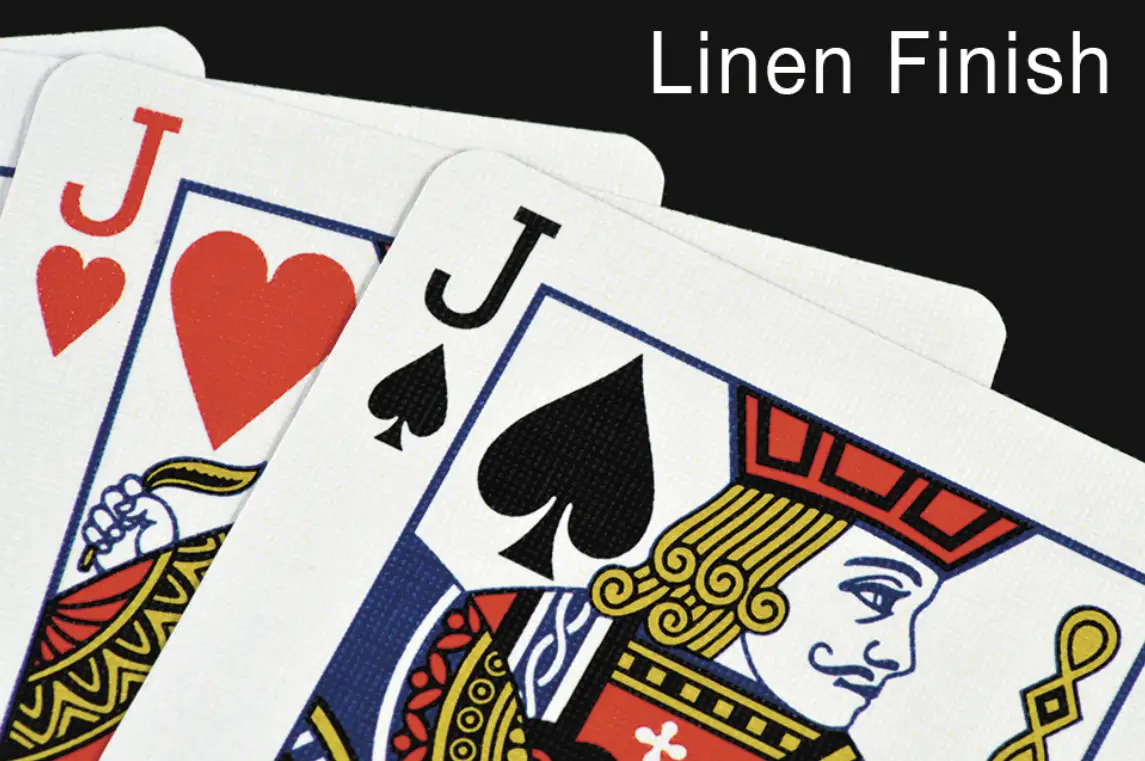
Benefits of Linen Finish
-
Enhanced Durability: The embossed texture helps reduce visible wear, making cards more resistant to scratches and creases.
-
Improved Handling: Ideal for sleight of hand and flourishes, the Linen finish offers a tactile grip without sticking.
-
Professional Look and Feel: That subtle texture creates a premium, sophisticated appearance that feels satisfying in the hand.
This finish is a favourite among professional magicians and cardists for its balance of control and fluidity. It’s also incredibly forgiving during fast-paced games, helping maintain crisp edges and clean surfaces even after extended use.
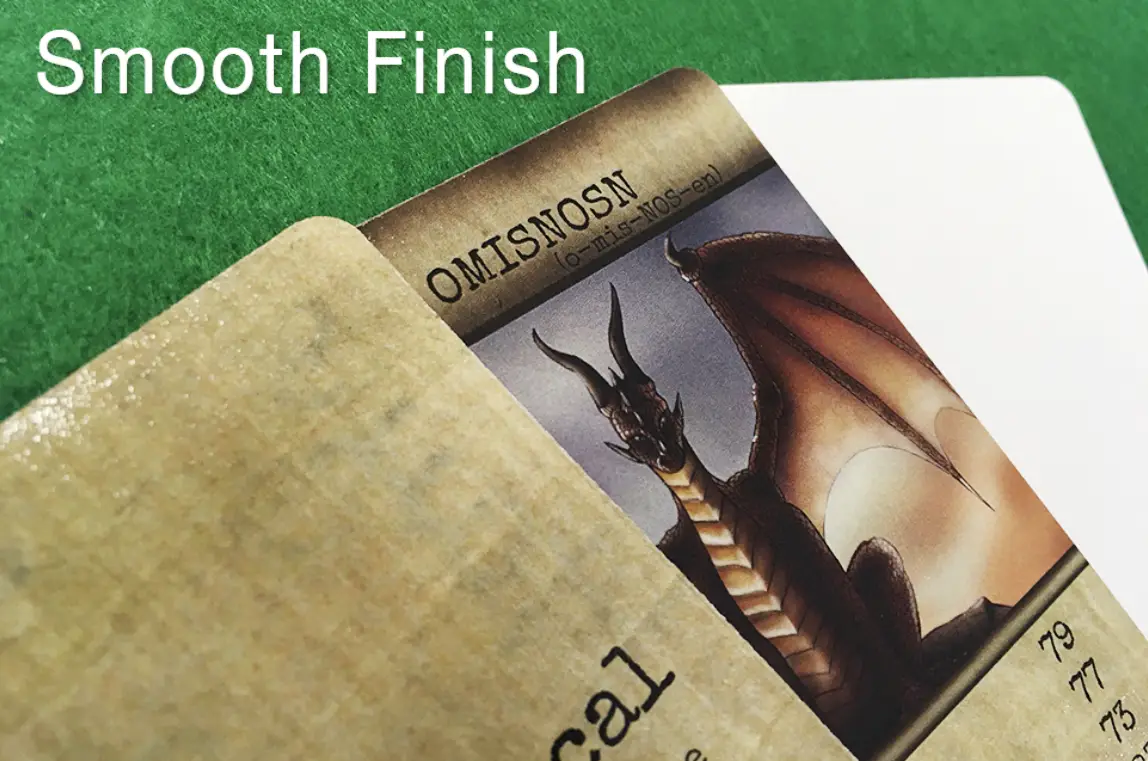
Benefits of Smooth Finish
-
Silky Shuffling: Smooth cards slide effortlessly, making for seamless overhand and riffle shuffles.
-
Vibrant Print Quality: With no surface embossing, artwork appears ultra-crisp and vivid, ideal for collectors or visually striking designs.
-
Long-Lasting Brilliance: The finish helps lock in colours, preventing fading or dulling over time.
Smooth finishes appeal to players and collectors alike who value a clean aesthetic and smooth handling. It provides a slick feel that’s both modern and classic.
9. Paper Stock & Finish
Common Choices
- Smooth finish: Clean look, softer handling
- Linen or textured finish: Improved grip, traditional feel
Consider:
Durability should match gameplay intensity.
Benefits of Linen Finish
-
Enhanced Durability: The embossed texture helps reduce visible wear, making cards more resistant to scratches and creases.
-
Improved Handling: Ideal for sleight of hand and flourishes, the Linen finish offers a tactile grip without sticking.
-
Professional Look and Feel: That subtle texture creates a premium, sophisticated appearance that feels satisfying in the hand.
This finish is a favourite among professional magicians and cardists for its balance of control and fluidity. It’s also incredibly forgiving during fast-paced games, helping maintain crisp edges and clean surfaces even after extended use.
Benefits of Smooth Finish
-
Silky Shuffling: Smooth cards slide effortlessly, making for seamless overhand and riffle shuffles.
-
Vibrant Print Quality: With no surface embossing, artwork appears ultra-crisp and vivid, ideal for collectors or visually striking designs.
-
Long-Lasting Brilliance: The finish helps lock in colours, preventing fading or dulling over time.
Smooth finishes appeal to players and collectors alike who value a clean aesthetic and smooth handling. It provides a slick feel that’s both modern and classic.
9. Paper Stock & Finish
Common Choices
- Smooth finish: Clean look, softer handling
- Linen or textured finish: Improved grip, traditional feel
Consider:
Durability should match gameplay intensity.
Benefits of Linen Finish
-
Enhanced Durability: The embossed texture helps reduce visible wear, making cards more resistant to scratches and creases.
-
Improved Handling: Ideal for sleight of hand and flourishes, the Linen finish offers a tactile grip without sticking.
-
Professional Look and Feel: That subtle texture creates a premium, sophisticated appearance that feels satisfying in the hand.
This finish is a favourite among professional magicians and cardists for its balance of control and fluidity. It’s also incredibly forgiving during fast-paced games, helping maintain crisp edges and clean surfaces even after extended use.
Benefits of Smooth Finish
-
Silky Shuffling: Smooth cards slide effortlessly, making for seamless overhand and riffle shuffles.
-
Vibrant Print Quality: With no surface embossing, artwork appears ultra-crisp and vivid, ideal for collectors or visually striking designs.
-
Long-Lasting Brilliance: The finish helps lock in colours, preventing fading or dulling over time.
Smooth finishes appeal to players and collectors alike who value a clean aesthetic and smooth handling. It provides a slick feel that’s both modern and classic.
10. Common Game Card Design Mistakes
-
Overloading cards with rules text
-
Inconsistent layouts across card types
-
Ambiguous wording or icons
-
Decorative design that obscures function
-
Designing before gameplay is finalised
Game cards should evolve alongside play-testing.
11. Ready to Print?
Before production, confirm that:
-
Gameplay is tested and stable
-
Card layouts are consistent and readable
-
Icons and terminology are fully defined
Print prototypes are essential for validating real-world play.
10. Common Game Card Design Mistakes
-
Overloading cards with rules text
-
Inconsistent layouts across card types
-
Ambiguous wording or icons
-
Decorative design that obscures function
-
Designing before gameplay is finalised
Game cards should evolve alongside play-testing.
11. Ready to Print?
Before production, confirm that:
-
Gameplay is tested and stable
-
Card layouts are consistent and readable
-
Icons and terminology are fully defined
Print prototypes are essential for validating real-world play.
10. Common Game Card Design Mistakes
-
Overloading cards with rules text
-
Inconsistent layouts across card types
-
Ambiguous wording or icons
-
Decorative design that obscures function
-
Designing before gameplay is finalised
Game cards should evolve alongside play-testing.
11. Ready to Print?
Before production, confirm that:
-
Gameplay is tested and stable
-
Card layouts are consistent and readable
-
Icons and terminology are fully defined
Print prototypes are essential for validating real-world play.